Big Rig Savings
crownsourceAuto & Vehicles
3.712.00 Reviews
- Version
- 5.0.0.0
- Installs
- 10.00K
- Age Rating
- Everyone
Screenshots
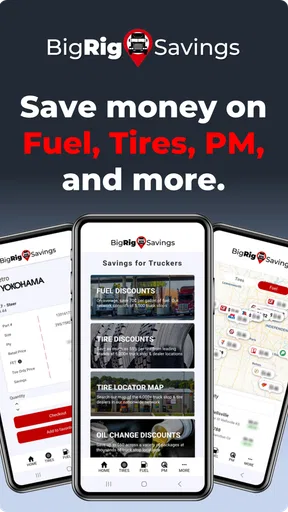
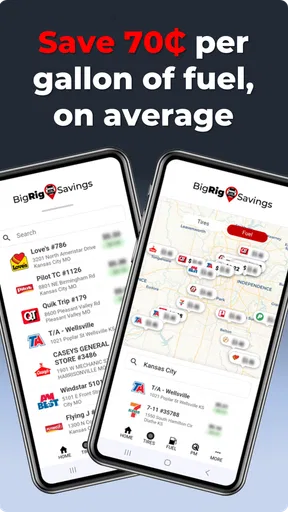
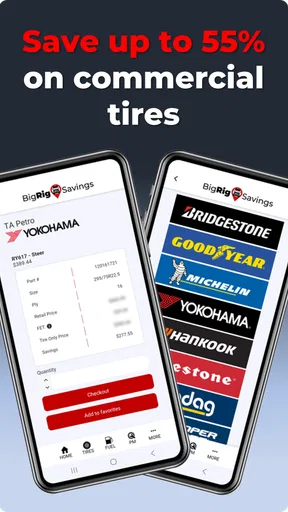
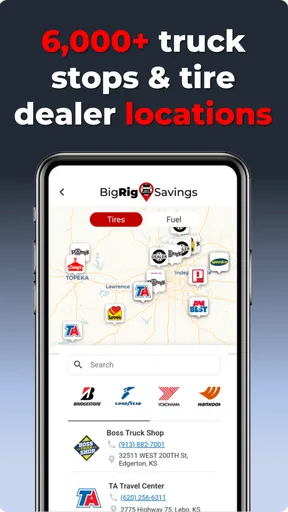
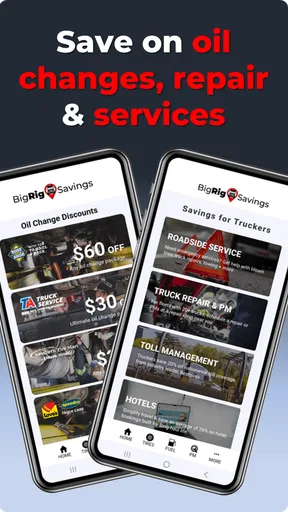
Our Review of Big Rig Savings
 Analysis by Appyee
I approached Big Rig Savings as a driver-focused tool rather than another general motoring app. Its purpose is easy to understand: help truckers and fleets keep an eye on the cost side of over-the-road work. That sounds simple, but the usefulness of an app like this depends less on flashy presentation and more on whether it fits naturally into a busy day of stops, fuel decisions, route changes, and paperwork.
My overall impression is that it is worth testing if you want a dedicated place for big-rig savings information and do not expect a full dispatch, navigation, or maintenance platform. It is free, aimed at everyone from an age-rating perspective, and published by crownsource. The app has reached over ten thousand installs, while its average sits at 3.7 from 23 ratings. That combination suggests a modest but real user base, with enough feedback to show interest without making it feel like a universally established industry standard.
Before relying on it during a trip, I would spend a few minutes learning where its useful information is located and how it fits beside the tools you already use. That small preparation matters because a savings app is most valuable when it supports a decision you are already making, not when you are trying to operate it while parked in an unfamiliar lot.
Where the first-time experience can become confusing
The main friction I would expect is not necessarily a technical failure. It is the difference between what a trucker needs at a particular moment and what a general savings tool presents. A driver may open the app looking for an immediate answer about the next fuel stop, while a fleet user may be thinking about repeatable cost control across several vehicles. Those are related needs, but they are not identical workflows.
For an owner-operator, the app makes the most sense as a companion to existing route planning. I would not treat it as a replacement for navigation or as the only source of information before committing to a stop. Instead, I would check it before leaving, compare the available savings information with the route I already intend to take, and then decide whether the saving justifies any added distance, waiting time, or change of plan.
That last part is important. A lower apparent cost is not automatically a better deal for a tractor-trailer. A turn that is easy in a car may be awkward for a rig. A stop may be too crowded at the time you arrive. A small saving can disappear if it adds a detour or delays a delivery. The practical value comes from combining the app’s information with your knowledge of the road, vehicle, schedule, and parking situation.
Fleet users may initially wonder whether the app is designed for one driver or for a larger operation. The store summary explicitly places both truckers and fleets in its audience, so I would evaluate it in two ways. A single driver can use it for personal trip decisions, while a fleet manager can look for repeatable habits: checking savings before planned fuel stops, comparing the result with internal records, and identifying whether the tool actually improves decisions over time.
I would also avoid judging the app after opening it once. Savings information is only useful when checked at the right point in a trip. If you browse too early, the route may change. If you wait until you are nearly empty, you have less freedom to compare options. My preferred routine would be to review it during trip preparation, then use it again at a safe stop when the next fuel decision becomes clearer.
What to check before depending on it
The first setup check is simple: install it on the device you actually use on the road and open it while stationary. The current version is 5.0.0.0, and the listed minimum operating system is Android 4.4, so compatibility should cover many older Android devices. Even so, an older phone may behave differently from a newer one, especially when several demanding apps are open at once.
I would make sure the app opens normally, that its main information is readable, and that you can move through the relevant screens without rushing. If you use a phone mounted in the cab, check the text from the position where you will see it. Tiny details that look fine in your hand can become distracting on a dashboard. This is not a reason to reject the app; it is a reason to confirm that it suits your particular device and mounting position.
Next, decide what question you want the app to answer. “Can I save money?” is too broad to guide a useful test. A better question is whether it helps you choose between realistic stops on a planned run, or whether it gives your fleet a consistent reference for savings discussions. Defining that question prevents a common mistake: treating every displayed opportunity as worthwhile without considering the full trip.
I would also establish a basic comparison method before using it. Note the option you would normally choose, the alternative suggested by the app, and the practical difference between them. You do not need complicated accounting. A short record of the stop, route impact, and final decision is enough to tell whether the app is helping or merely adding another screen to your routine.
For fleet use, this check is even more useful. Ask drivers to follow the same simple process rather than each person interpreting the app differently. One driver might focus only on the listed saving, while another includes time and access. A shared method produces more meaningful results. The app can support a fleet conversation, but it cannot decide what your company considers an acceptable detour or delay.
Because the app is free, there is little financial risk in trying it. The real cost is attention. If it takes too long to consult, or if the information does not match the decisions you need to make, that time becomes the reason to stop using it. I would give it a fair trial during normal trips rather than testing it only in an ideal situation.
A safer way to recover when the workflow breaks
When an app does not behave as expected, I start with the least dramatic explanation. Confirm that the phone is responsive, close and reopen the app, and try again while parked. If the problem appears only during a particular trip, compare that moment with a later attempt. This helps separate a one-time interruption from a repeatable issue without turning troubleshooting into a roadside distraction.
If the information seems stale or does not match what you expected, do not immediately assume that the entire app is unusable. Recheck the route, the location you are considering, and the timing of the decision. Savings information is only meaningful in context, and a change in your planned stop can make a previously useful result irrelevant. I would also avoid making a purchase decision solely because one screen appears favorable.
A good recovery workflow is to return to the last decision you understood. If you were comparing two possible stops, write down those options, close the app, and reopen it later when safely parked. Then compare the result again. This prevents a confusing screen or interrupted session from pushing you into a rushed choice. The app should reduce uncertainty, not create a new safety problem.
Another useful habit is keeping your normal navigation and operational tools available. Big Rig Savings belongs beside those tools, not in place of them. If you lose access to the app at the wrong time, continue with the route and procedures you already trust. Revisit the savings question at the next safe opportunity. That approach protects the trip from becoming dependent on one application.
For a fleet, recovery should include communication. If several drivers report the same difficulty, record the device type, operating-system situation, and point in the workflow where the issue appeared. If only one phone has trouble, the cause may be local rather than a general problem with the app. This basic separation saves time and avoids changing a whole fleet process because of one isolated device.
I would not recommend repeatedly reinstalling an app while on the road or experimenting with unfamiliar phone settings during a delivery run. General checks are sensible; disruptive changes are better left for a parked, controlled moment. Since the app is a supporting tool rather than a driving control, there is no good reason to let troubleshooting interfere with safe operation.
When the app may not be the cause
Truckers work in environments where signal quality, weather, crowded lots, device age, and competing apps can all affect the experience. If the app appears slow, first consider whether other applications are also struggling. A phone handling navigation, calls, messaging, and other operational tasks may simply be under pressure. Closing unnecessary apps and trying again later can reveal whether the issue is specific to Big Rig Savings.
Location and route assumptions can also explain an unexpected result. A driver may think in terms of the next town, while the app may be presenting information around a broader area. Before concluding that the information is wrong, check that you are comparing the same place and the same travel plan. The difference between a nearby option and a practical option for a long vehicle can be substantial.
There is also a human factor. If a driver consults the app only after deciding where to stop, the result may feel unhelpful because the decision has already been made. The better sequence is to check early enough to influence the choice, then validate the option against road access, schedule, and vehicle needs. This is one of the most important workflow improvements I would make.
Another limitation is that savings alone do not capture every operational cost. Time, congestion, parking, safe entry and exit, driver fatigue, and delivery commitments all matter. The app can be useful for the financial part of the conversation, but it should not be expected to measure every consequence of changing a stop. A fleet manager who needs detailed fuel accounting, dispatch coordination, maintenance records, or route intelligence may be better served by a broader specialist platform.
Likewise, a casual driver who rarely operates a large vehicle may not gain much from a dedicated truck-focused savings tool. The value is strongest for people making repeated over-the-road decisions. If your need is only occasional price checking, a general map or fuel-finding service may be simpler. Choosing the narrower tool makes sense when its focus matches your routine.
How it compares with the usual alternatives
The common alternative is to rely on a general navigation or fuel-finding app. Those tools are often convenient because they combine maps, directions, and location search in one place. They may be the better choice when the immediate need is finding a workable stop, checking the route, or navigating unfamiliar roads. Big Rig Savings has a different appeal: it gives the savings question its own place in the workflow instead of burying it among general travel information.
That focus can be helpful for an owner-operator who already has trusted navigation. Rather than replacing the familiar route tool, I would use this app to add a cost-conscious check before committing to fuel or other road-related choices. The trade-off is that you now have another app to consult, and the benefit depends on whether its information changes a decision in a useful way.
For fleets, the comparison is with internal spreadsheets, fuel-card tools, or larger transportation-management systems. A spreadsheet can be more flexible for recording company-specific rules, while a full fleet platform may connect savings with dispatch and reporting. Big Rig Savings is more approachable when you want a focused, free starting point without committing to a larger system. It is less suitable if your operation needs deep historical analysis or one central control panel.
I see the app as an additional lens rather than a complete operating system for trucking. That is not a weakness by itself. In fact, a narrow tool can be easier to test. The important question is whether the savings information is clear enough and timely enough to improve your existing process. If it does, the extra step is justified. If it does not, a broader tool that already sits inside your daily workflow may be more efficient.
Who should try it and who should skip it
I would recommend giving it a chance if you are an owner-operator, a regular long-haul driver, or a small fleet looking for a dedicated way to think about road savings. Its free price makes experimentation straightforward, and the everyone age rating keeps the audience broad. The strongest candidate is someone willing to compare options before a stop rather than expecting the app to make every decision automatically.
I would be more cautious if you need a complete navigation solution, real-time dispatch management, detailed maintenance tracking, or sophisticated fleet accounting. Those needs go beyond the app’s focused role. You may still find it useful as one part of a larger setup, but it should not be the only application supporting those responsibilities.
I would also skip it if you dislike checking a separate tool and already have a reliable process that captures savings inside another platform. An app is not automatically valuable because it is specialized. It has to save enough money, time, or decision effort to earn its place on your phone. The best test is practical: use it during several normal decisions and see whether it changes your choice for a good reason.
My practical verdict after looking at the whole workflow
Big Rig Savings is a focused Android app for truckers and fleets who want savings to be part of their regular over-the-road planning. I like the idea of giving that concern its own workflow, especially for drivers who already have navigation and simply want a more deliberate cost check. The free price lowers the barrier to trying it, and the low minimum Android requirement makes it approachable for users with older devices.
At the same time, I would keep expectations measured. A savings app cannot account for every reality of operating a big rig, and the cheapest-looking option may not be the most practical one. The best results will come from checking it while parked, comparing its information with a real route, and considering time, access, safety, and schedule before acting.
The rating of 3.7 from around two dozen ratings tells me to approach it as a useful niche tool that still deserves personal testing, not as a guaranteed fit for every driver. Its audience has grown beyond ten thousand installs, but it remains the kind of app I would evaluate against my own routine rather than choose because everyone in trucking uses it.
My recommendation is straightforward: install it before a planned run, learn the basic flow at home or while parked, and use a few real decisions to judge its value. Keep your normal navigation and operational backup in place. If the app helps you spot worthwhile savings without adding confusion, it can earn a permanent place in your setup. If it only repeats information you already have or encourages inconvenient detours, move back to the tools that fit your route better.
In short, this is best viewed as a practical companion for cost-aware driving, not a replacement for the rest of your trucking toolkit. Used with judgment, Big Rig Savings can make the savings question easier to remember and discuss. Its real success depends on how cleanly it fits into the decisions you already make on the road.
Verdict
Strengths of Big Rig Savings
- Helps compare prices across multiple truck and equipment listings.
- Useful filters make it easier to narrow searches by vehicle type and budget.
- Listing details can support faster buying decisions for fleet operators.
- Convenient mobile access for checking deals while away from the office.
- May help small businesses discover used rigs at more competitive prices.
Limitations of Big Rig Savings
- Listing quality may vary depending on the seller and information provided.
- Some attractive deals may require quick action before availability changes.
- Search results may be limited in certain regions or vehicle categories.
- Users should independently verify mileage, maintenance history, and ownership records.
- Additional costs such as delivery, taxes, and financing may not be shown upfront.
Similar Picks in This Category
View All
Android Auto
Google LLC4.1

maxim — order a taxi & food
PT. SITO4.7

Штрафы ГИБДД: проверка с фото
Pays LLC – Штрафы ГИБДД4.7

Номерограм – проверка авто
Авто Ассист4.8

Дром Авто
Дром4.9

Frequently Asked Questions
What is Big Rig Savings, and who is the app designed for?
Big Rig Savings is a mobile savings and discount platform created primarily for truck drivers and other transportation professionals. It can help users discover deals, promotions, and money-saving opportunities related to fuel, food, maintenance, lodging, equipment, and everyday purchases. Before downloading, check the current store description to confirm that the available offers match your location and driving needs.
How can Big Rig Savings help truck drivers save money?
The app is intended to bring relevant discounts and savings opportunities together in one place, which may make it easier for drivers to compare offers while on the road. Depending on the current listings, savings can involve fuel stations, restaurants, truck stops, services, or products. Actual discounts, participating businesses, eligibility rules, and expiration dates can vary, so always read each offer carefully before making a purchase.
Is Big Rig Savings free to download and use?
Big Rig Savings may be available as a free download, but users should review the official Google Play or App Store listing for the latest pricing information. Some features, memberships, partner offers, or promotional programs could have separate conditions or costs. It is also wise to check whether an offer requires registration, a subscription, a specific payment method, or additional verification before relying on it for a planned saving.
Does Big Rig Savings work everywhere, or are the offers location-based?
The usefulness of Big Rig Savings may depend heavily on your location and the participating businesses in your area or along your route. Some promotions can be limited to particular states, cities, stores, truck stops, or partner networks, while others may have nationwide availability. Enable location access only if you are comfortable doing so, and confirm the offer’s coverage and expiration details before traveling to redeem it.
What should I check before downloading and using Big Rig Savings?
Before installing Big Rig Savings, review the app’s permissions, privacy policy, recent user feedback, supported operating-system versions, and update history. Confirm whether the app requires an account, location services, notifications, or personal and payment information. After installation, test the search and offer details without making assumptions about availability. Because discounts can change, verify the final terms directly with the participating business before completing a purchase.
